
Fixing "No Internet" in KVM/QEMU VMs on CachyOS (When You're Running ufw)
If you're running CachyOS (or any Arch-based distro) with ufw enabled, and your KVM/QEMU virtual machines boot fine but can't reach the internet — or can't even get a DHCP lease — there's a good chance ufw is the culprit, not libvirt or QEMU.
The symptom
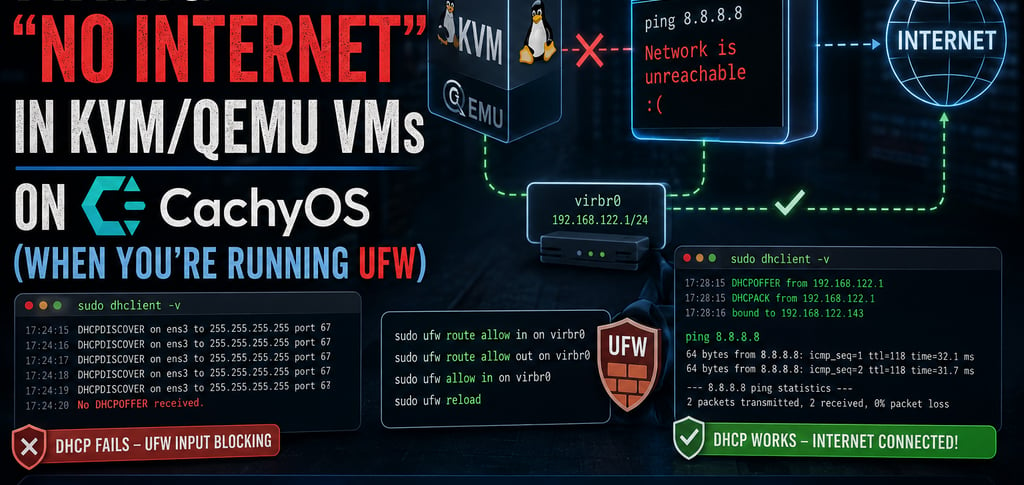
You install qemu-full, libvirt, and virt-manager, everything installs cleanly, the default NAT network shows as active in virsh net-list --all, and virbr0 has its 192.168.122.1/24 address. You boot a VM, try to ping out, and get:
ping: connect: Network is unreachable
Digging further, you find the guest never even got an IP address. Running sudo dhclient -v inside the guest shows it endlessly sending DHCPDISCOVER with no DHCPOFFER ever coming back.
Why this happens
Libvirt manages its own nftables table (libvirt_network) to handle NAT and forwarding for VMs on the default network, and that table is configured correctly out of the box. The problem is that ufw also installs rules into the same nftables hooks — and by default, its INPUT and FORWARD chains have a drop policy for anything not explicitly allowed.
This causes two distinct blocks, depending on where you are in the process:
DHCP fails first. When a VM boots, it broadcasts a DHCP request to the host (192.168.122.1, where dnsmasq is listening). That's traffic arriving at the host itself, which goes through ufw's INPUT chain — and gets silently dropped before dnsmasq ever sees it. No lease, no IP, nothing to ping with.
Forwarding fails next. Even if the guest already has a static IP, general outbound traffic from the VM to the wider internet passes through the host's FORWARD chain. Libvirt's own rules accept it — but ufw's rules run too, and its default-drop forward policy kills new connections that aren't already established.
Both are "your firewall is doing its job a little too well" problems, not bugs in libvirt, QEMU, or CachyOS.
The fix
Two ufw commands, covering both chains:
# Allow traffic being forwarded through the virtual bridge (VM <-> internet) sudo ufw route allow in on virbr0 sudo ufw route allow out on virbr0 # Allow traffic arriving at the host on the bridge (DHCP, DNS from dnsmasq) sudo ufw allow in on virbr0 sudo ufw reload
Restart networking inside the guest (or just reboot the VM), and DHCP should now complete normally:
sudo dhclient -v
You should see DHCPOFFER and DHCPACK where before it only showed repeated DHCPDISCOVER. From there, ping 8.8.8.8 and ping google.com should both work.
How to verify it worked
Check that ufw actually picked up the new rules in its nftables chains:
sudo nft list ruleset | grep -A5 "chain ufw-user-forward"
You should see explicit accept entries for iifname "virbr0" and oifname "virbr0".
The general lesson
If you're setting up KVM/QEMU on an Arch-based host and you also run a firewall tool (ufw, or a hand-rolled nftables ruleset), don't assume libvirt's own firewall rules are the only ones in play. Any table with a default-drop policy on INPUT or FORWARD will silently eat VM traffic unless you explicitly punch a hole for the virtual bridge interface. It's a two-minute fix once you know to look for it — the hard part is realizing your firewall, not your hypervisor, is the thing standing in the way.